
Configuration
Guide to configuring avatars.
Add Avatar Descriptor
The avatar needs to be configured with specific components to work correctly in Nox.
-
Select the root of your avatar in the
Hierarchywindow. -
In the
Inspectorwindow, you can seen the Animator component.
If the avatar is correctly rigged, the CCK Avatar should be visible withAdd Avatar Descriptorbutton.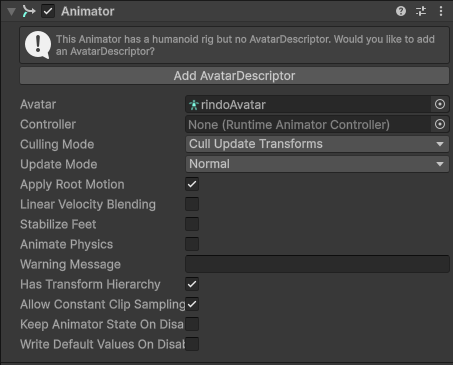
-
Click on
Add Avatar Descriptorbutton to add the CCK Avatar component.
The avatars are based on Modules.
All features are provided by modules that can be added or removed as needed.
See the Modules page for detailed information about available modules.
Animator
For the most compatibility, the Controller in Animator component must be empty.
The animation will be handled by the Playable Avatar Module.
Importants Modules
The first modules to add are:
- Camera Avatar Module: to define the position of the camera relative to the avatar.
- Playable Avatar Module: to define the Unity Animator Controllers for the avatar.
- Avatar Parameter Module: to define custom parameters for the avatar.